
If you're only on Airbnb and thinking about adding more channels, you'll run into unfamiliar terms fast — "channel manager," "PMS," "managed all-in-one." Before you compare vendors, it helps to know why you'd bother in the first place, what these terms actually mean, and what questions decide which one fits your business.
Why staying Airbnb-only may not be a good idea
Before you compare software, it's worth being honest about why you'd bother expanding beyond Airbnb in the first place.
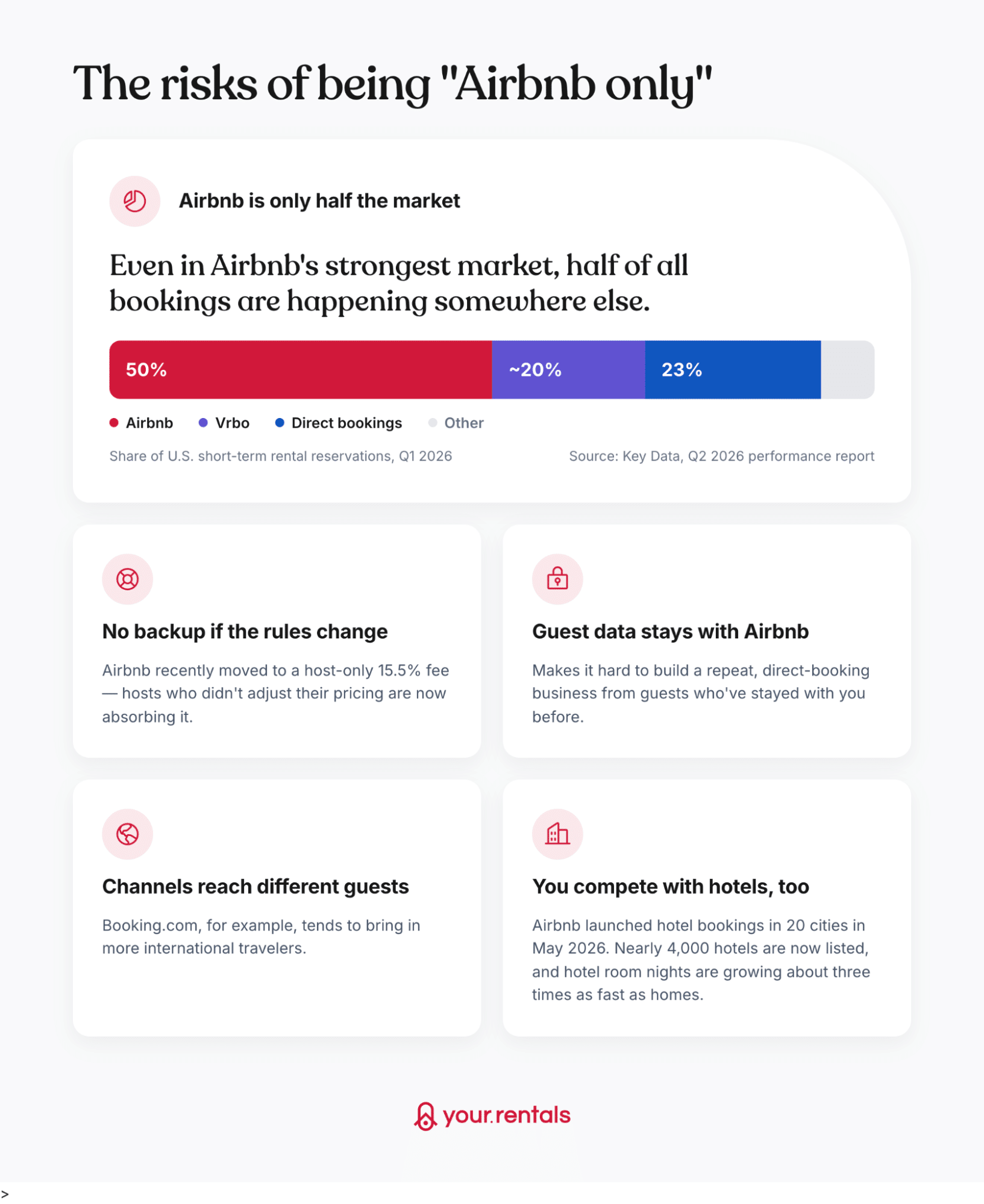
None of this means you need to rush a decision. It just means "should I add more channels" and "which software should I use" are two separate questions. Get clear on the first before vendors start pulling you into the second.
2. What a channel manager is, and what types exist
Strictly speaking, a channel manager is just the piece of software that syncs your listing, calendar, rates and booking rules out to sales channels — Airbnb, Booking.com, Vrbo, and so on.
The system that actually holds your listings and calendar is usually called a PMS (property management system).
Ten years ago, these were often two separate products you'd buy and connect yourself.
Today, almost every vendor bundles both into one platform — which is why you'll usually see them sold together as "PMS/Channel Manager," even though they're technically two different functions.
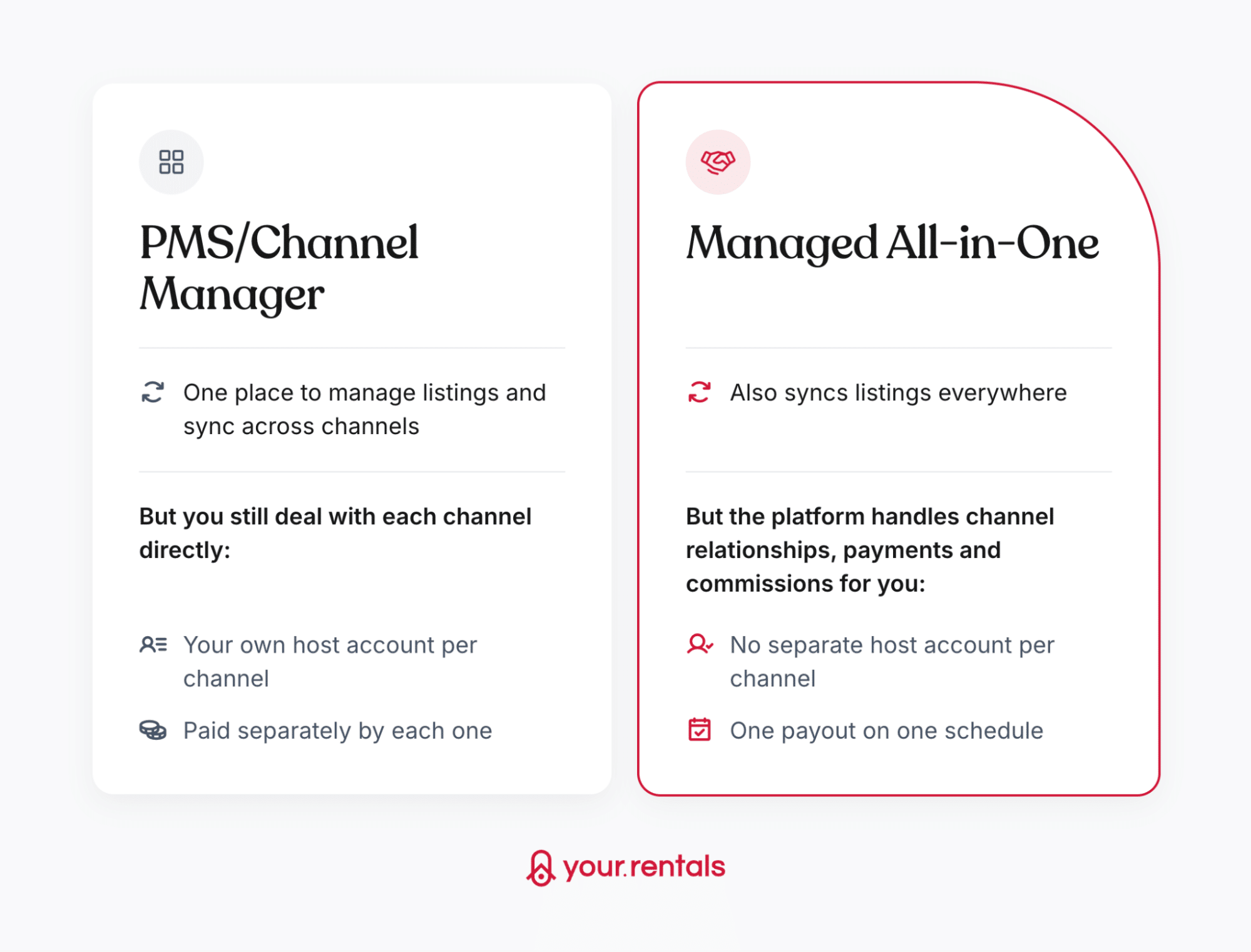
When you start shopping, you'll see two types of platforms:
3. Things to ask yourself before you pick one
Once you're ready to compare, these are the things that actually decide which type — and which vendor — fits your business.
Do you already have host accounts on other channels?
If you've already set up accounts on Booking.com, Vrbo or others (outside Airbnb), a PMS/Channel Manager is usually the easier path — you can connect what you've already built instead of starting over. If you don't, and don't want the hassle of setting them up one by one, a Managed All-in-One skips that step entirely.
Do you have your own Stripe account or point-of-sale system you want to keep?
A PMS/Channel Manager supports that — you keep collecting guest payments yourself. A Managed All-in-One usually collects and processes payments for you instead, which means giving that up.
Do you rely on other tools, like dynamic pricing software or AI guest messaging?
Check whether your PMS/Channel Manager supports the specific tools you already use — most have a marketplace of approved vendors. A Managed All-in-One is more likely to build that functionality in rather than plug into what you already pay for, so switching may mean dropping a subscription you already rely on.
Does single invoicing matter to you?
With separate channel relationships, you'll get a separate invoice and commission statement from each one — useful to know before tax time, especially if you're managing multiple properties. A Managed All-in-One consolidates that into one invoice per booking.
Do you want one payout, on one schedule, to one bank account?
Or is it fine tracking different payout timings and methods from each channel separately? This is one of the more tedious parts of managing channels directly — a Managed All-in-One removes it by paying you out on a single schedule regardless of where the booking came from.
Would you rather pay a subscription, or a fee that only kicks in when you earn?
PMS/Channel Managers today usually aren't a flat, one-size fee either — most price in tiers based on how many listings you manage, or scale with usage, the same way most SaaS pricing works now.
The real difference isn't "fixed vs. scales" — it's what happens in a slow month. A subscription charges you whether or not you get any bookings. A per-booking fee only charges you when you actually earn something. Worth doing the math yourself: work out roughly what you'd pay in subscription fees over a year, and compare that to what a per-booking fee would come out to based on your typical earnings, to see which one actually costs you less.
Do you want all your reporting in one place? Or are you fine logging into each channel separately for payout and performance details? This matters more the more channels you add — checking five different dashboards for performance data adds up fast.
Is one point of contact for support worth something to you?
With a PMS/Channel Manager, a problem with a specific booking usually means contacting that channel directly. A Managed All-in-One gives you one team to go to regardless of which channel the issue is on.
How much does your own brand matter on every listing?
Some Managed All-in-One platforms publish your listing under their own brand rather than yours on certain channels — worth checking if brand visibility to guests matters to your business.
How to actually decide
Look back at your answers above. A few of them are about things you'd have to give up — existing host accounts, a payment setup you like, tools you already pay for. If any of that applies to you, that's a real reason to stick with a PMS/Channel Manager.
The rest — one invoice, one payout, paying only when you earn, one dashboard, one point of contact — aren't about giving anything up. They're just about how much hassle you're willing to deal with. If most of those matter to you, that's a convenience worth paying for.
So it comes down to this: are you protecting something you've already built, or are you ready to trade some control for one simple setup? If it's the first, go with a PMS/Channel Manager. If it's the second, a Managed All-in-One — like Your.Rentals — is the easier path.
A few things worth checking before you sign anything
If you're comparing PMS/Channel Manager vendors against each other, two traps come up a lot.
First: their pricing pages can look simple but rarely are. The headline price is usually just the base tier — check what's actually included at that level, and what gets pushed into a paid add-on, especially reporting, integrations and support. Two vendors advertising the same monthly price can end up costing very differently once you add what you actually need.
Second: check how calendars sync. A double booking costs you money and damages your standing with the channel you have to cancel on. Make sure your platform uses real-time API sync, not iCal. iCal wasn't built for real-time updates, so the risk of overlap is much higher.
Where this leaves you
If you've already got host accounts, your own payment setup, and specific tools you don't want to give up, start with a PMS/Channel Manager. If you'd rather hand off the channel relationships, payments and support, and just get one simple payout, a Managed All-in-One is probably easier — and Your.Rentals falls into that category. For the specifics — setup, payouts, pricing and support, compared directly — see our article.
